
Reviews
Subterranean Scout Precision Adventure delivers a satisfying experience for players who enjoy methodical exploration. The 3D underground environments are atmospheric without being distracting, and the short level lengths make it easy to pick up and play. The upgrade system between stages provides a clear sense of progression, encouraging players to refine their approach. Controls are responsive and intuitive, supporting the core gameplay of careful observation. While the game may not offer extensive content, its focused design and free accessibility make it a worthwhile choice for fans of precision-based exploration.
About this game
Core Exploration Mechanics
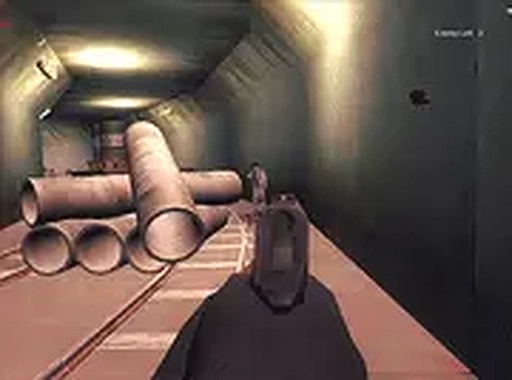
Subterranean Scout Precision Adventure places players in the role of a scout moving through dimly lit underground passages. The primary activity involves navigating each corridor while searching for objects that may be concealed in shadows or behind structural elements. The game rewards methodical movement and a sharp eye for detail. Each area is compact but densely arranged, requiring players to examine every corner thoroughly. There is no time pressure, allowing for a relaxed pace that emphasizes careful observation over speed.
Visual Design and Atmosphere
The game uses 3D graphics to create an immersive subterranean environment. Lighting plays a key role, with many items placed in darker zones that require players to adjust their viewing angle or move closer for a better look. The corridors are designed with varied layouts, ensuring that each new passage feels distinct. The visual style supports the core gameplay by making the search for hidden objects both challenging and rewarding.
Progression and Equipment Upgrades
After completing each section, players enter an upgrade screen where they can enhance their gear. Options may include improvements to range or precision, which can make subsequent searches more efficient. This system adds a strategic layer, as players must decide which upgrades best suit their play style. The upgrades carry forward, providing a sense of progression across multiple stages.
Controls and Accessibility
The game is designed for desktop computers using a mouse and keyboard. Mouse movements control the camera and interaction, while keyboard inputs handle movement. The controls are straightforward, focusing on aiming and careful navigation. Since the game runs in a standard web browser without additional plugins, it is accessible to anyone with a modern computer and internet connection. The short level lengths make it suitable for quick play sessions.







Comments
Sign in to leave a review
No account? Create one
No comments yet.